
What’s New in RICOH CloudStream v2.9.1?
In this version, we added new features, fixed some bugs, and made some improvements for both DM and Print&Scan, and following components are included.
| Version category | Version | Update | Detail |
| Release note version | v2.9.1 | ✓ | – |
| Component version (DM) | v1.4.1 | ✓ | See what’s new and release note below. |
| Component version (Print&Scan) | v2024.11.28 |
✓ | See what’s new and release note below. |
◆DM component(v1.4.1)
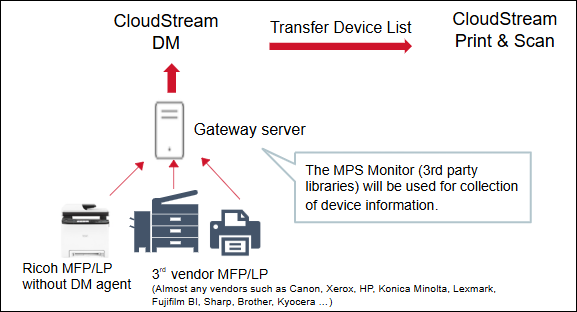
・On-premise Multi-Vendor Monitoring function released
- We support 3rd party devices and Ricoh devices with the Device Management (DM) license. It only provides monitoring function and does not support device configuration. For 3rd vendor devices, monitoring function requires gatway server except for RICOH devices.
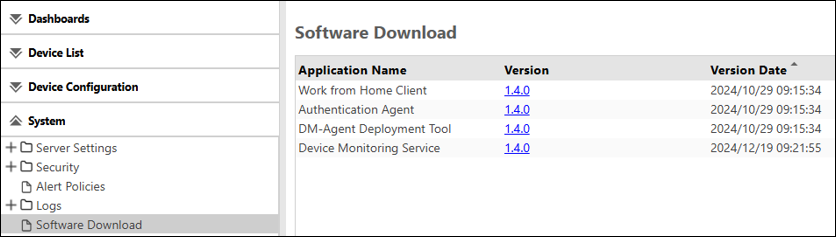
- The installer (“Device Monitoring Service”, version 1.4.0) can be downloaded via DM UI.
・Okta IDP support
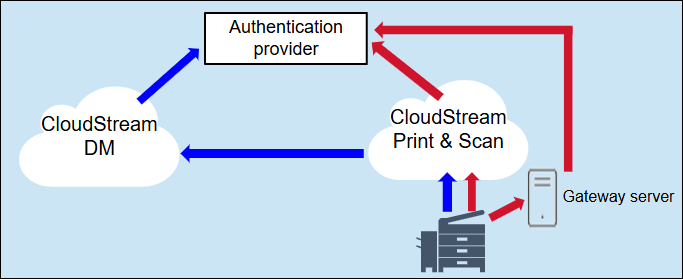
- Okta was only supported in CloudStream Print&Scan, but it is now also supported in CloudStream DM. This enables the use of Okta as SSO even when combining CloudStream DM and CloudStream Print&Scan.
- For your reference, the authentication flow is illustrated in the image below. The red arrow shows an authentication flow in CloudStream PS only.When using CloudStream DM, authentication is always performed via cloud (CloudStream DM) as indicated by the blue arrow.
◆Print&Scan component(v2024.11.28)
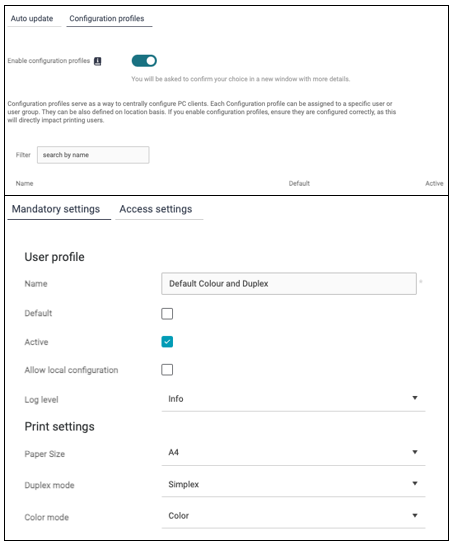
・Centralized management for PC clients
- Administrators can now centrally manage PC Client options (Allow local configuration, Log level, Paper Size, Duplex/simplex, and Color/grayscale) from PrintScan UI. Please go to “Configuration profiles” on “PC client” section and hit Add button, and you can find the fields to set the options according to your needs.
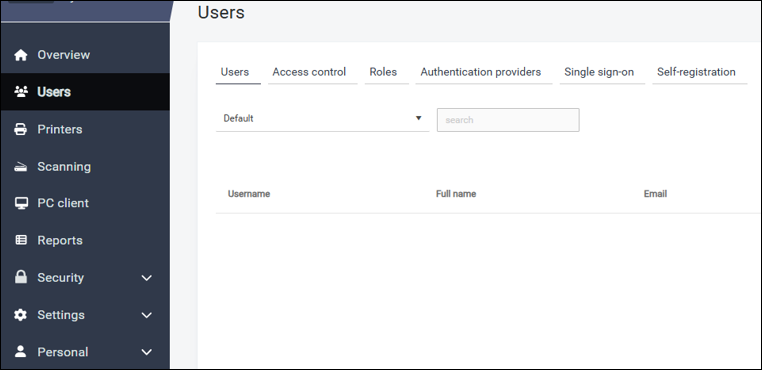
・Updates on the left tree navigation on PrintScan UI
- The left tree navigation on PrintScan UI becomes organized and simplified by categories. For example, Users, Access control, Roles, and Authenticaion providers existed independently, but now they all categorized as “Users” section.
Release Notes
+ Added feature
x Improved/changed feature
– Bug fixed
! Limitation
Device Management
+ On-premise Multi-Vendor Monitoring function newly supported.
Dashboard/Reporting
No updates.
System
+ Okta IDP now supported for SSO.
+ Card CSV file of Import/Export support
+ RICOH IM C401F/C401SRF compatible.
+ RICOH IM C3010SD/C3510SD/C4510SD/C6010SD compatible.
– Power usage data can be seen for Artemis.
– Failure to register a large number of customer tenants.
– Departments where LDAP, OIDC and OKTA user belongs are not displayed under User Management.
– Connection check error resolved on OKTA Authentication Profile.
– Capital letters can be pasted and saved in Customer Prefix.
PrintScan UI
+ Admin Web UI menu has a new structure to simplify the navigation.
– More printers with the same IP address (e.g. in different subnets) now work correctly with embedded configuration.
Secondary Gateway
No updates.
PC Client
+ An administrator can centrally manage PC Client options (Allow local configuration, Log level, Paper Size, Duplex/simplex, and Color/grayscale).
– PC client in hybrid mode is correctly registered when the “Automatically trust new clients/servers” is enabled.
– PC client contains correct Ghostscript binaries.
Authentication
No updates.
Performance and security enhancements
No updates.
Printing
No updates.
Scanning
No updates.
Partner hosted and on-premises installations
No updates.
Ricoh Cloud Terminal (Gen2)
No updates.
Fujifilm BI Cloud Terminal (Gen2)
No updates.
HP Workpath Cloud Terminal (Gen2)
No updates.
Konica Minolta IWS Cloud Terminal (Gen2)
x Deployment documentation improvements.
Xerox Cloud Terminal (Gen2)
x Improved speed of printing multiple documents on Xerox Cloud Terminal.
Brother Embedded Terminal
No updates.
Canon Embedded Terminal
No updates.
HP OxPD Embedded Terminal
No updates.
HP Workpath Embedded Terminal
No updates.
Konica Minolta Open API Embedded Terminal
No updates.
Kyocera Embedded Terminal
No updates.
Lexmark Embedded Terminal
No updates.
Sharp Embedded Terminal
No updates.
API
No updates.
Chrome Extension
No updates.
Driver
No updates.
Installation (OVA file)
No updates.
Internet ports
No updates.
Mobile app
No updates.
Messaging
No updates.