
What’s New in RICOH CloudStream v2.2.0?
In the v2.2.0 release, we added new features, fixed some bugs, and made some improvements for DM and Print&Scan. Here are included components in this release note version.
| Version category | Version | Update | Detail |
| Release note version | v2.2.0 | ✓ | – |
| Component version (DM) | v1.2.1 | ✓ | See what’s new and release note below |
| Component version (Print&Scan) | v3.46.2 | ✓ | See what’s new and release note below |
*RICOH Cloud Terminal (Gen2) that will be deployed by CloudStream DM is not updated at the moment. It will be updated in CloudStream DM in next v2.3.0.
◆DM component(v1.2.1)
・Agreement documents displayed for first login users are updated.
◆Print&Scan component(v3.46.2)
・Updates on Scanning
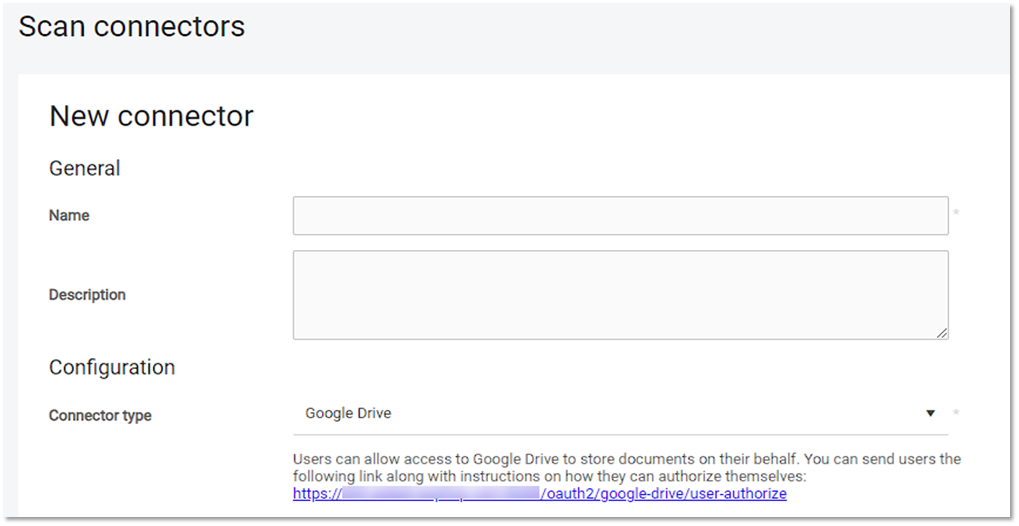
- Scan to Google Drive becomes available with following features.
- User-Friendly Authorization: Users can authorize access to Google Drive via a shared link or via their profile page.
- Per-User Control : Users authorize via OAuth 2.0 and can revoke access anytime from their Google Account.
- Efficient File Management : Scanned files are delivered to a specified directory in Google Drive.
- Enhanced Security : The Google Drive connector only allows access to files and folders created by RICOH CloudStream, protecting personal user data.
Release Notes
+ Added feature
x Improved/changed feature
– Bug fixed
◆DM component(v1.2.1)
Device Management
Dashboard/Reporting
No updates.
System
x Agreement documents displayed for first login users are updated.
◆Print&Scan component(v3.46.2)
PrintScan UI
+ Users can now upload documents to be printed in the PrintScan UI. This feature is currently available upon request in the Early Access Program.
– When creating an Access control record, the authentication providers dropdown list is now correctly sorted from highest to lowest priority.
– Fixed a problem when the first search after logging in to the PrintScan UI in Mozilla Firefox wasn’t working.
– All successfully printed jobs are reported as ‘success’ in metrics.
Secondary Gateway
No updates.
PC Client
– PC Client defaults to the default API key if the API key field is left blank after deleting the optional API key.
– When PC Client is installed with authentication type = 5 (legacy openid), the type no longer changes after rebooting the workstation, and the user stays logged in.
Authentication
No updates.
Performance
No updates.
Printing
– Direct print jobs are now printed even if they exceed the threshold of 2 minutes.
Scanning
+ Users can now scan to Google Drive.
Partner hosted and on-premises installations
No updates.
Ricoh Cloud Terminal (Gen2)
+ You can now configure the card reader PID/VID via the Terminal Deployment Tool.
+ The users now see their full names on the terminal. If the full name is not filled in CloudStream, the users will see their usernames.
+ Terminal version is reported to server in login report.
+ The terminal now supports Port 443.
+ You can now select the input tray (limitation removed).
+ Added Norwegian language support.
x Scan app is no longer displayed on Printer-only devices.
– You can now run an instant scan workflow even if its default parameters have invalid values.
– The scan and workflow settings are now scrollable.
– The order of Home and Up folder buttons on the folder browse parameter screen is now correct.
– The terminal uninstallation no longer fails when the terminal was configured to use other authentication options than a card.
– Scan job accounting endpoint no longer fails with error 500 for unknown user.
– If a document server application scans and the terminal wants to scan simultaneously, a correct error message is displayed.
– Fixed issue where sometimes the “endpoint already exists” screen is misaligned.
– The “Device encountered an issue” error message now has correct spacing.
– After uninstallation from Web UI, the terminal icon no longer remains on the home screen of the MFD.
– When scanning from the glass, the A4 format is now correctly detected; the terminal no longer displays an error message.
– The authentication screen no longer freezes while the terminal attempts to fetch the logo.
Fujifilm BI Cloud Terminal (Gen2)
No updates.
HP Workpath Cloud Terminal (Gen2)
No updates.
Konica Minolta IWS Cloud Terminal (Gen2)
– The user experience with scanning has been improved.
– For a booklet with top binding, the orientation is now set to landscape so that the document can be printed correctly.
Brother Embedded Terminal
No updates.
Canon Embedded Terminal
No updates.
HP OxPD Embedded Terminal
No updates.
HP Workpath Embedded Terminal
No updates.
Konica Minolta Open API Embedded Terminal
No updates.
Kyocera Embedded Terminal
No updates.
Lexmark Embedded Terminal
No updates.
Sharp Embedded Terminal
No updates.
Xerox Embedded Terminal
No updates.
API
No updates.
Chrome Extension
No updates.
Driver
No updates.
Mobile apps
No updates.