
What’s New in RICOH CloudStream v2.7.0?
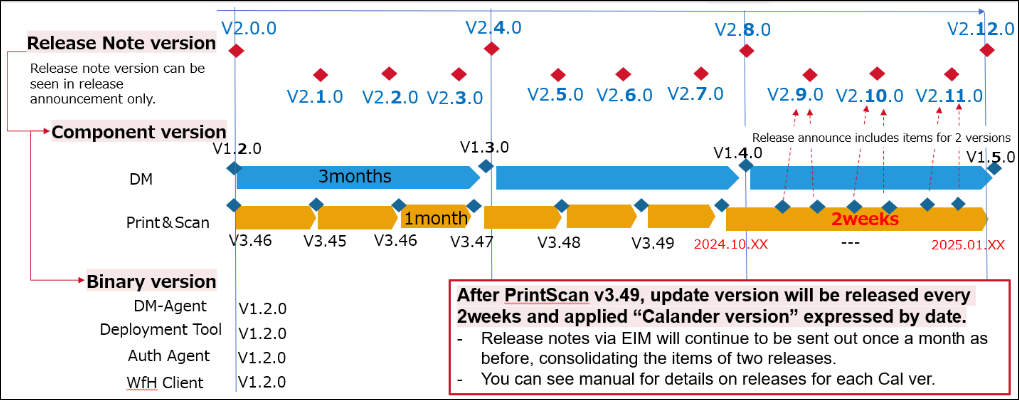
In this version, we added several new features, fixed some bugs, and made some improvements for Print&Scan, and following components are included. Also, the version policy of Print&Scan is updated.
| Version category | Version | Update | Detail |
| Release note version | v2.7.0 | ✓ | – |
| Component version (DM) | v1.3.2 | – | See the previous announcement (v2.6.1) |
| Component version (Print&Scan) | v2024.10.03 | ✓ | See what’s new and release note below |
◆Common
・Version policy of Print&Scan component updated
◆DM component(v1.3.2)
・No update this time. Please check the previous release announcement. (v2.6.1)
◆Print&Scan component(v2024.10.03)
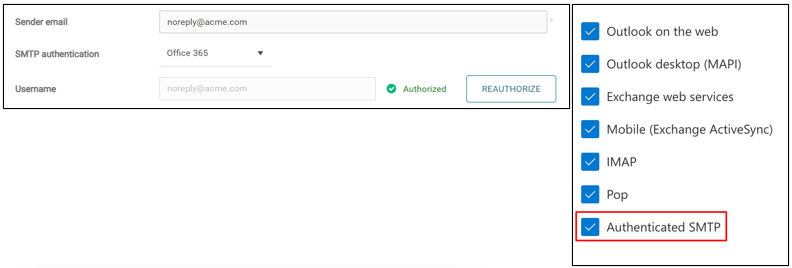
・Modern Authentication options available for Messaging
- With OAuth2 support, integration with cloud services is available for messaging features and scan workflows. Office 365 (Microsoft 365) is the new option as of now.
・PC Client now supports Proxy
- PC Client now supports both Plain Proxy without authentication and Kerberos Authentication with tokens acquired directly from user sessions. It supports for both Windows and Mac clients, but Mac doesn’t support proxy autodiscovery.
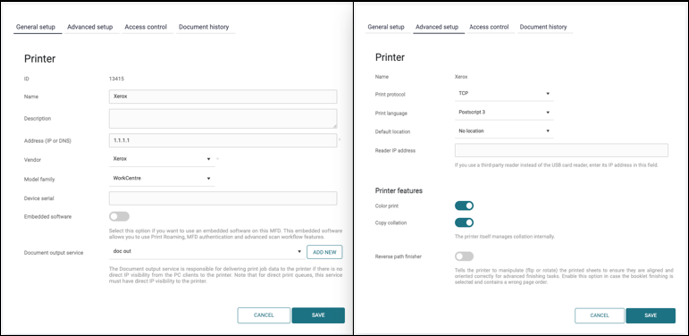
・Printer configuration form is updated
- With the settings tab split from two into four, the number of required fields has been reduced, making the printer configuration even easier.
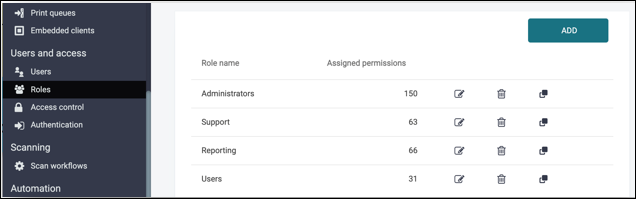
・UI of roles and permissions are updated
- The UI of Roles page is updated and now you can identify how many permissions are assigned for each role at a glance.
Release Notes
+ Added feature
x Improved/changed feature
– Bug fixed
! Limitation
◆DM component(v1.3.2)
◆Print&Scan component(v2024.10.03)
PrintScan UI
+ You can now delete the logo or background image from customer settings.
+ Secondary Gateway OVA (Rocky Linux) download links are now available in the Installation files library.
x Printer configuration form improvements: The new printer form is well structured and leads the admin towards the printer creation in a logical and easy way.
x Redesigned UI for the assignment of Access Rights Permissions for user roles and API keys.
x When editing the logged-in user in Users, the newly added values are reflected in the current user session and are visible on the My Profile page.
x The PC Client auto-update page now displays correct counts of PC Clients connected in the last 90 days.
Secondary Gateway
No updates.
PC Client
+ Forward proxy support for the RICOH CloudStream Client.
! Due to the changed MacOS 15 security model, the PC Client autoupdate functionality from previous versions doesn’t work, and the users must update to version 2024.10.03 manually. After re-installation, the update mechanism will be supported again. The print functionality of the existing version(s) is not impacted.
x Improved UI in the auto-update table, notifications, and reporting.
– UPN no longer logs out the user and no longer shows a notification after each re-login when the user’s PC goes to sleep.
Authentication
No updates.
Performance and security enhancements
x Updated 3rd party components to mitigate vulnerabilities.
Printing
No updates.
Scanning
No updates.
Partner hosted and on-premises installations
No updates.
Ricoh Cloud Terminal (Gen2)
No updates.
Fujifilm BI Cloud Terminal (Gen2)
No updates.
HP Workpath Cloud Terminal (Gen2)
No updates.
Konica Minolta IWS Cloud Terminal (Gen2)
No updates.
Xerox Cloud Terminal (Gen2)
No updates.
Brother Embedded Terminal
No updates.
Canon Embedded Terminal
No updates.
HP OxPD Embedded Terminal
No updates.
HP Workpath Embedded Terminal
No updates.
Konica Minolta Open API Embedded Terminal
No updates.
Kyocera Embedded Terminal
No updates.
Lexmark Embedded Terminal
No updates.
Sharp Embedded Terminal
No updates.
API
No updates.
Chrome Extension
No updates.
Driver
No updates.
Installation (OVA file)
No updates.
Internet ports
No updates.
Mobile app
+ Admins can now configure the Mobile app via MDM.
Messaging
+ The Messaging service now allows modern authentication with Microsoft (and Google, as soon as verified) allowing email messages and scan workflows to use OAuth2 instead of basic authentication.