
What’s New in RICOH CloudStream v2.5.0?
In this release, we added new features on Web UI and PC client, fixed some bugs, and made some improvements for Print&Scan and following components are included.
| Version category | Version | Update | Detail |
| Release note version | v2.5.0 | ✓ | – |
| Component version (DM) | v1.3.0 | – | See the previous announcement (v2.4.0) |
| Component version (Print&Scan) | v3.48 | ✓ | See what’s new and release note below |
◆DM component(v1.3.0)
・No update this time. Please check the previous release announcement. (v2.4.0)
◆Print&Scan component(v3.48)
・Xerox Cloud Terminal (Gen2) release:
- Gen2 Embedded Client for Xerox is finally available as well as RICOH, HP, Konica Minolta, and Fujifilm BI, and it provides the same user experience as them. It supports Altalink, Versalink, and some Work Centre devices, but PrimeLink will be supported soon.
- Note: However, it has 2 limitations as follows as of now.
- The card reader is not recognized frequently after the device is waken up, and the auth screen falls to the default auth method (PIN, username/password).
- Pull print basic finishing options, simplex short edge print changed to long edge print is printed as simplex.
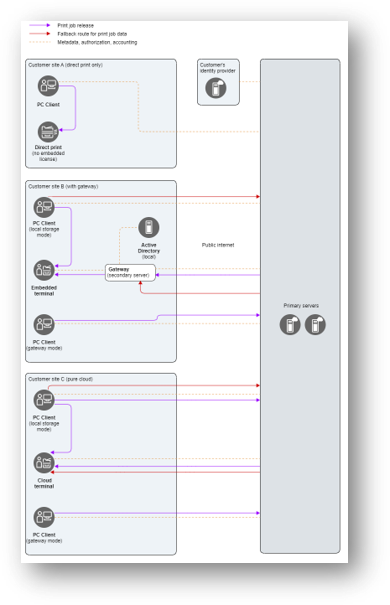
・Port 443 available for outbound communication:
- User were required to set special port “Port 8443” for RICOH CloudStream PrintScan, but the standard port “Port 443” is now available so that customers no longer need to open the new port for outbound communication for following clients.
- Cloud Terminals excluding Fujifilm BI, Win/Mac PC Clients, and secondary gateway servers
- It ensures robust security measures while maintaining seamless connectivity, safeguarding sensitive data and mitigating potential risks.
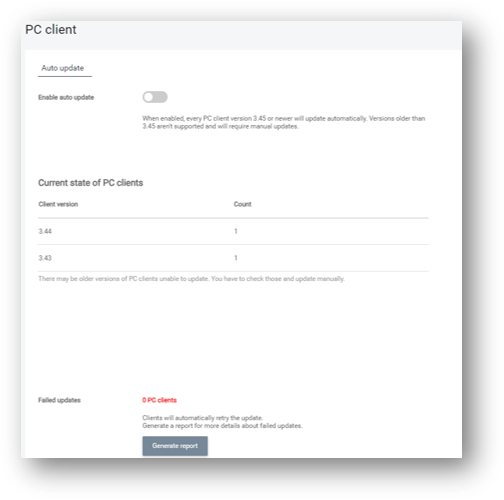
・PC Client auto-update:
- Customers can now keep their PC Clients up-to-date automatically, and it enhances security and performance with the latest product enhancements.
- In additon to the benefit to end users, administrators now have complete visibility of their environment with a snapshot view of installed client versions across their estate.
・Updates on installation:
- An OVA (Open Virtualization Archive) is a file format that packages a complete virtual appliance, but its Operating System has reached end-of-life and has been replaced with Rocky Linux. This provides Enterprise-Grade stability and timely updates and security patches.
・Updates on PrintScan UI:
- Entra ID authentication now works with Single Tenant Support, which enables RICOH CloudStream to meet strict industry regulations and data residency requirements, ensuring your customer’s printing environment aligns with legal and compliance standards. It customize security policies, access controls, and configurations specific which customers need, and provide greater flexibility and control.
Release Notes
+ Added feature
x Improved/changed feature
– Bug fixed
! Limitation
◆DM component(v1.3.0)
◆Print&Scan component(v3.48)
PrintScan UI
+ For all new customers, a default pull queue is created during the deployment to speed up the initial setup. The queue name is localized.
+ PrintScan UI login page now contains links to Ricoh privacy policies.
x Entra ID OIDC authentication now works with single-tenant configuration and no longer requires multi-tenant configuration.
x The Web UI favicon was improved.
x If no signing certificate in PKI and Encryption settings is selected, the users cannot log in to PC Client via the manual login method. You are now alerted to such situation in the Account health section.
x You can now hide download links and the news banner. There are two new permissions to allow this: ViewNewReleaseNotification and ViewClientAndMobileDownload.
x The texts and the layout of the document upload section in My documents have been improved.
– The cloud terminal deployment documentation link on the Web UI now correctly opens a page with instructions.
・Severity: C (intuitive workaround)
・Root cause: the documentation page was split per vendor in the documentation which was not reflected in the links on Web UI.
・Bug recurrence defense: adopt a new documentation tool and process.
– Accented letters (ěščřžýáíéů) are now shown in consistent font with the rest of the letters.
・Severity: C (no user impact)
・Root cause: automated tests did not catch the visual difference.
・Bug recurrence defense: no action taken.
Secondary Gateway
No updates.
PC Client
+ PC Client will automatically update to the latest version. This is enabled for new customers. The existing ones can set it up in PrintScan UI in Configuration > PC Client.
Authentication
No updates.
Performance and security enhancements
x Documents sent via API converting to print for over 5 minutes will not be accepted. They are now marked as failed and shown with the respective status in the Web UI. This also applies to MS Office documents over 200MB or Excel files with over 10,000 pages.
x PC Client was updated to use the latest and most secure version of GhostScript 10.03.1.
Printing
x A3 paper size can be now fetched in job detail from the API reporting endpoint.
Scanning
No updates.
Partner hosted and on-premises installations
No updates.
Ricoh Cloud Terminal (Gen2)
No updates.
Fujifilm BI Cloud Terminal (Gen2)
No updates.
HP Workpath Cloud Terminal (Gen2)
No updates.
Konica Minolta IWS Cloud Terminal (Gen2)
No updates.
Xerox Cloud Terminal (Gen2)
+ Xerox Gen 2 Cloud Terminal is now available to all customers.
! There are two known limitations, that will be resolved soon:
・The card reader is not recognized frequently after the device is waken up, and the auth screen falls to the default auth method (PIN, username/password).
・Pull print basic finishing options, simplex short edge print changed to long edge print is printed as simplex.
Brother Embedded Terminal
No updates.
Canon Embedded Terminal
No updates.
HP OxPD Embedded Terminal
No updates.
HP Workpath Embedded Terminal
No updates.
Konica Minolta Open API Embedded Terminal
x Konica Minolta OpenAPI Terminal can now be used in environments with a load balancer as long as there is X-Forwarded-For header where the origin IP address of the client is stored.
Kyocera Embedded Terminal
No updates.
Lexmark Embedded Terminal
No updates.
Sharp Embedded Terminal
No updates.
API
No updates.
Chrome Extension
No updates.
Driver
No updates.
Installation (OVA file)
x Rocky Linux 9.4 is used with image (OVA) for the NUC HW appliance.
Internet ports
+ All CloudStream components (all cloud terminals (Gen2), PC Client, and gateways) now support communication via port 443 (HTTPS). Therefore, you don’t need to open any additional ports to the Internet. The only exception is the FUJIFILM BI Cloud Terminal, which will be supported later.
Mobile app
No updates.